Python 多进程下保证时间轮转日志安全
1.Python logging 模块是线程安全的吗?
答案是,日志handler 的处理流程, handle → emit → stream.wrtite → stream.flush
Handle 基类的 handle方法 这一步骤已经上了锁, 也就是每条日志都是安全的刷入到文件中,才会有下一条,因此不会造成日志混乱。另外日志切分也是再emit 函数里做的,所以切分也是安全的;
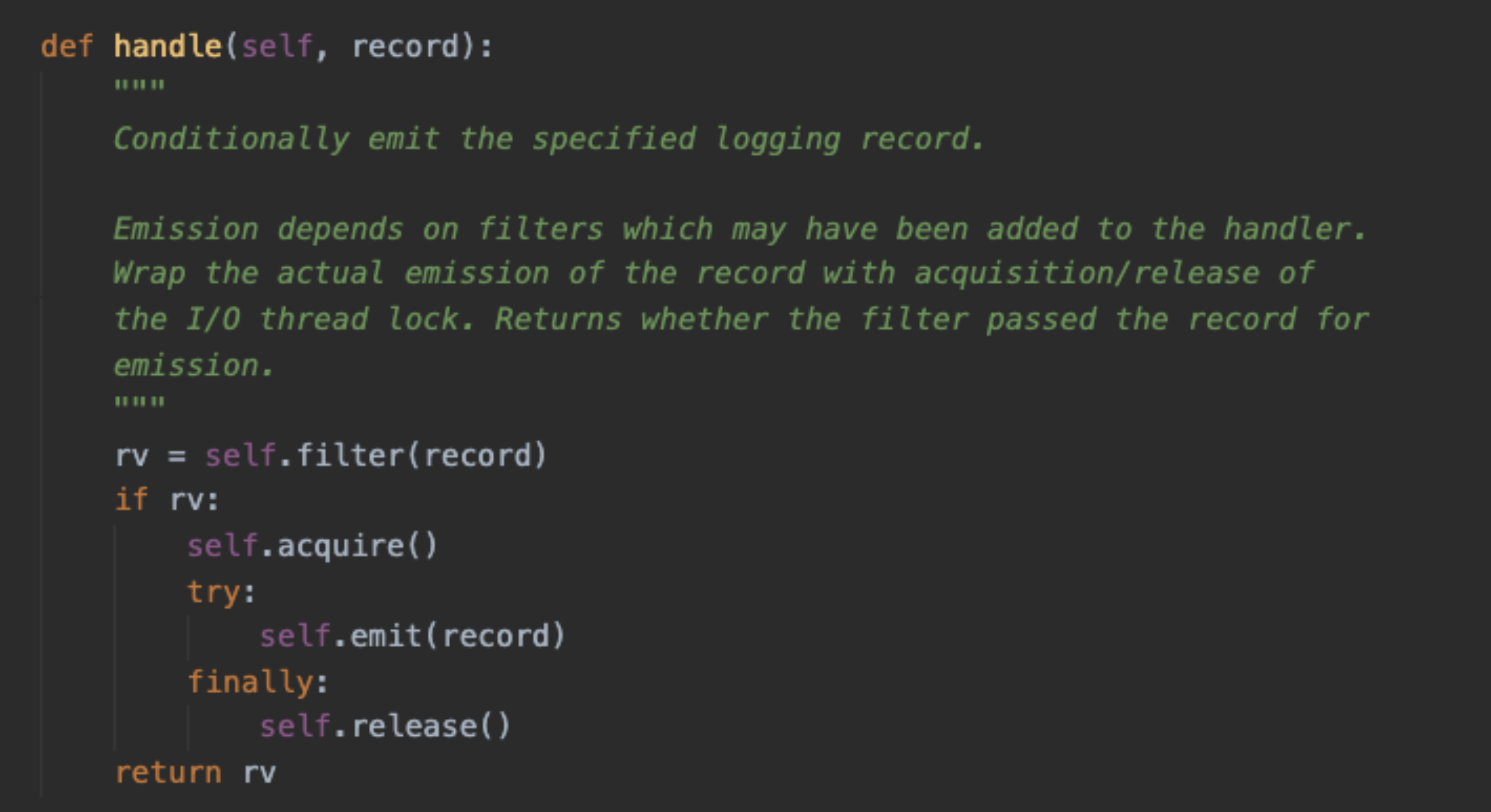
2.多进程下, TimedRotatingFileHandler 会发生什么问题? 主要是由于日志切分导致的;
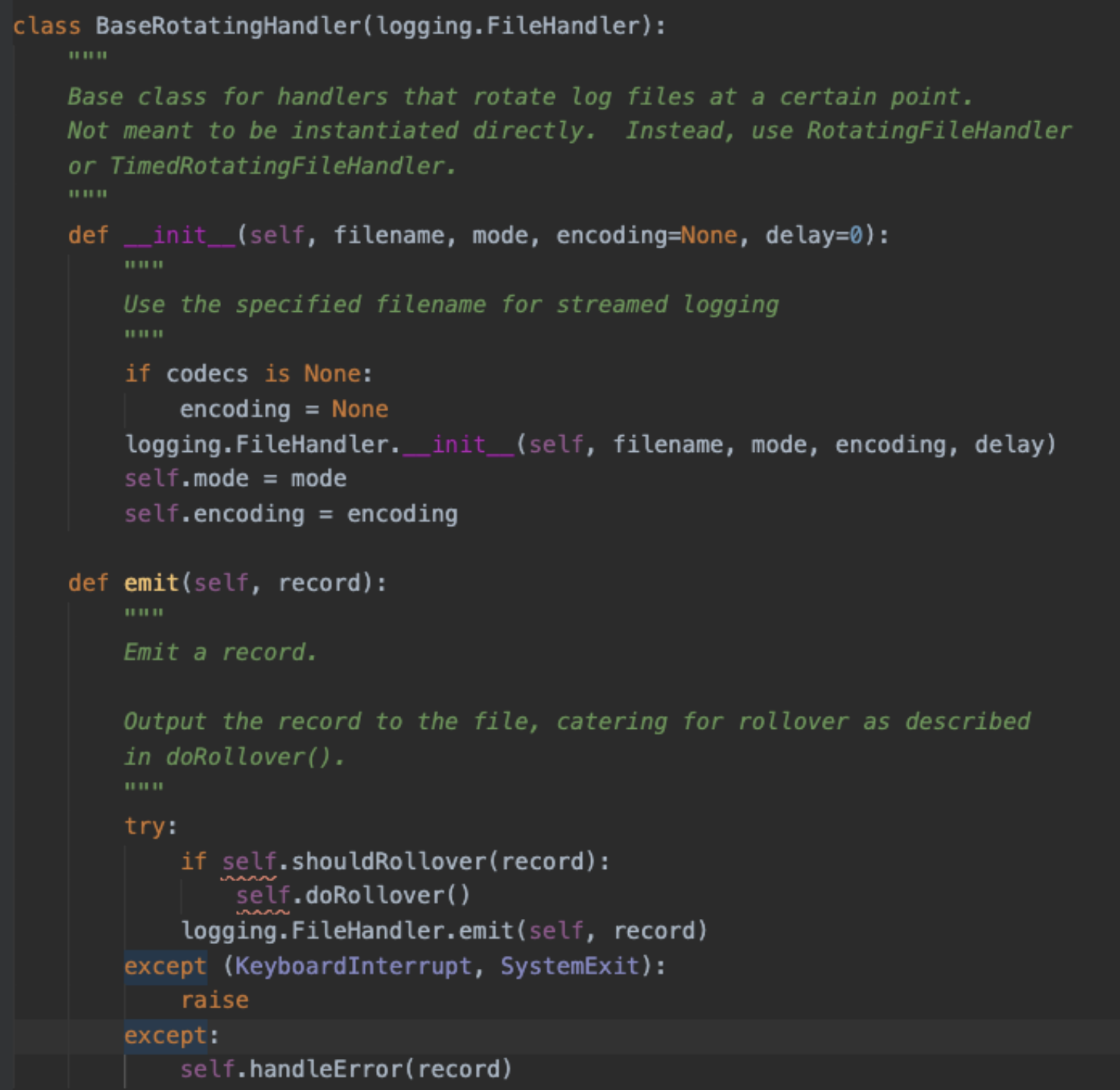
我们先来看一下日志轮转的代码, emit 的时候,会先判断是否应该做日志切分;日志切分时,先判断切分的目标文件是否存在,存在就删掉,见红色文字1;之后再重命名基本日志文件,见红色文字2; 问题因此产生, 假设有3个进程, 分别为1、2、3, 日志文件为a.log
- a. 进程1进入日志切分,切分的目标文件名是 a.log.1, 目标文件不存在,因此直接重命名 a.log → a.log.1, 然后新建a.log文件继续写入;
- b. 稍后进程2也进入日志切分, 切分的目标文件名是a.log.1, 目标文件存在,直接删除(导致日志丢失), 然后重命名 a.log → a.log.1, 并且新建a.log文件继续写入,此时 进程2写入a.log, 进程1写入a.log.1(导致日志写入混乱,会发生a.log, a.log.1 分别对应的是两个进程的最新日志刷入,这就很尴尬,查日志的时候,得看两个日志);
- c. 进程3也进入日志切分,切分的目标文件名是a.log.1, 目标文件存在,直接删除(导致日志丢失), 然后重命名 a.log → a.log.1, 并且新建a.log文件继续写入, 此时进程3写入a.log, 进程2写入a.log.1, 进程1写入旧 a.log.1(因为文件已经删除,close后,直接丢失)
总结: 如果每次日志切分都按照上面abc 的顺序执行, 那么最终的结果,只有进程2的日志保留着, 进程1, 3 的日志都会丢失 解决办法:
- 1. 日志切分时,我们获取进程锁,进行相应的操作,来保证安全;
-
- 之前日志是按照执行的时间来进行切分, 也就是进程重启了,日志得重新计算执行时间来进行下次切分,我们可以改造成按照时间戳的间隔来切分,从而解决不同进程不同时间启动导致的日志丢失问题;
- 之前日志是按照执行的时间来进行切分, 也就是进程重启了,日志得重新计算执行时间来进行下次切分,我们可以改造成按照时间戳的间隔来切分,从而解决不同进程不同时间启动导致的日志丢失问题;
3.多进程下,除了日志切分带来问题, 日志写入文件是安全的吗?会发生日志内容交错的混乱吗?
会,比如进程1 写入aaaaaaaa….aaaa, 进程2写入bbbbbbb…bbbb, 结果日志内容却是 aaaabbbbbbaaaa的情况;
- 3.1 讨论这个问题前, 我们先了解一下, 我们语言层面的write 函数。当我们write写数据的时候,其实调用的是c语言的write函数,c语言的write函数并没有直接做系统调用, c语言库在设计的时候,考虑到系统调用是比较耗费性能的操作,因此产生了一个buffer的概念,写入的内容,是直接写入到缓冲区,当缓冲区的内容满足一定的条件,才会真正的进行系统调用write;
- 3.2 buffer 有三中类型, unbuffered, line buffered, fully buffered, 分别是不缓冲、行缓冲、全缓冲,我们在open文件的时候是可以通过buffering参数指定的, Python open文档中默认用的系统的设置, 通过测试,确定是4kb的全缓冲类型, 也就是写入达到4kb以上,才会进行系统调用。 但是我们也能通过主动调用flush 函数触发系统调;logging 模块就是每条日志都会调用flush 函数;
- 3.3 可查看FileHandler 基类中,_open 方法,对于有encoding编码要求的,使用的是codecs.open 打开方式, 默认buffering=1, 也就是行缓冲,碰到换行符号,会进行系统调用write, 从而不能保证一条日志的写入原子 性。为了避免自动的进行系统调用write, 应该指定buffering参数,我默认设置的buffering=8192, 只要每条日志不超过8kb,主动调用flush 函数触发系统调用write,整条日志写入文件总是原子性的;
- 3.4 系统调用write 就一定能一次性完整的将要求的数据写入到文件吗? 根据文档描述, write 函数返回值,返回的是成功写入的byte大小,也就是不一定一次性写完。但是不能一次性写完的情况比较少见,如:没有足够的空间了, 被信号打断了等。对于我们的日志场景下, 是可以忽略的。
总结: 只要我们设置好buffering 大小, 保证每条日志不超过该大小,那么多进程下, 我们的日志写入总是原子的, 不会发生错乱的情况;
4.进程锁如何选择?
flock、lockf 的区别,可以参考 链接, 最终我选择的是 lockf, 主要考虑两点:
- 1.NFS下能够生效;
- 2.子进程不应该继承父进程的锁,从而避免死锁的困扰;
5.最终的Handler 代码如下:
# file1.py


import fcntl
import os
import time

class FileLock(object):
    """file ex lock, sub process can not inherit"""
    def __init__(self, file_path):
        self.fd = open(file_path, 'w')

    def acquire(self):
        """acquire lock"""
        fcntl.lockf(self.fd, fcntl.LOCK_EX)
        return self

    def release(self):
        """release lock"""
        fcntl.lockf(self.fd, fcntl.LOCK_UN)

    def __enter__(self):
        """enter"""
        return self

    def __exit__(self, exc_type, exc_val, exc_tb):
        """exit"""
        self.release()

    def close(self):
        """clean fd resource"""
        self.fd.close()


# file2.py
from logging.handlers import TimedRotatingFileHandler
from framework.process_lock import FileLock
import multiprocessing
import time
import os
try:
    import codecs
except ImportError:
    codecs = None


class MultiprocessSafeTimedRotatingFileHandler(TimedRotatingFileHandler):
    """multi process safe handler"""
    def __init__(self, buffering=8192, *args, **kwargs):
        assert buffering >= 4096
        self.buffering = buffering
        super(MultiprocessSafeTimedRotatingFileHandler, self).__init__(*args, **kwargs)
        head, tail = os.path.split(self.baseFilename)

        self.process_lock = FileLock('{}/.{}.lock'.format(head, tail))

    def computeRollover(self, currentTime):
        """sure per complete interval roll """
        currentTime = currentTime / self.interval * self.interval
        return super(MultiprocessSafeTimedRotatingFileHandler, self).computeRollover(currentTime)

    def _open(self):
        """
        Open the current base file with the (original) mode and encoding.
        Return the resulting stream.
        """
        if self.encoding is None:
            stream = open(self.baseFilename, self.mode, buffering=self.buffering)
        else:
            stream = codecs.open(self.baseFilename, self.mode, self.encoding, buffering=self.buffering)
        return stream

    def doRollover(self):
        """
        do a rollover; in this case, a date/time stamp is appended to the filename
        when the rollover happens.  However, you want the file to be named for the
        start of the interval, not the current time.  If there is a backup count,
        then we have to get a list of matching filenames, sort them and remove
        the one with the oldest suffix.
        """
        if self.stream:
            self.stream.close()
            self.stream = None
        # get the time that this sequence started at and make it a TimeTuple
        currentTime = int(time.time())
        dstNow = time.localtime(currentTime)[-1]
        t = self.rolloverAt - self.interval
        if self.utc:
            timeTuple = time.gmtime(t)
        else:
            timeTuple = time.localtime(t)
            dstThen = timeTuple[-1]
            if dstNow != dstThen:
                if dstNow:
                    addend = 3600
                else:
                    addend = -3600
                timeTuple = time.localtime(t + addend)
        dfn = self.baseFilename + "." + time.strftime(self.suffix, timeTuple)
        if not os.path.exists(dfn):
            with self.process_lock.acquire() as plock:
                if not os.path.exists(dfn):
                    os.rename(self.baseFilename, dfn)
                    if self.backupCount > 0:
                        # find the oldest log file and delete it
                        #s = glob.glob(self.baseFilename + ".20*")
                        #if len(s) > self.backupCount:
                        #    s.sort()
                        #    os.remove(s[0])
                        for s in self.getFilesToDelete():
                            os.remove(s)
        #print "%s -> %s" % (self.baseFilename, dfn)
        self.stream = self._open()
        newRolloverAt = self.computeRollover(currentTime)
        while newRolloverAt <= currentTime:
            newRolloverAt = newRolloverAt + self.interval
        #If DST changes and midnight or weekly rollover, adjust for this.
        if (self.when == 'MIDNIGHT' or self.when.startswith('W')) and not self.utc:
            dstAtRollover = time.localtime(newRolloverAt)[-1]
            if dstNow != dstAtRollover:
                if not dstNow:  # DST kicks in before next rollover, so we need to deduct an hour
                    addend = -3600
                else:           # DST bows out before next rollover, so we need to add an hour
                    addend = 3600
                newRolloverAt += addend
        self.rolloverAt = newRolloverAt